Fill in a Valid IRS 433-F Form
Document Sample

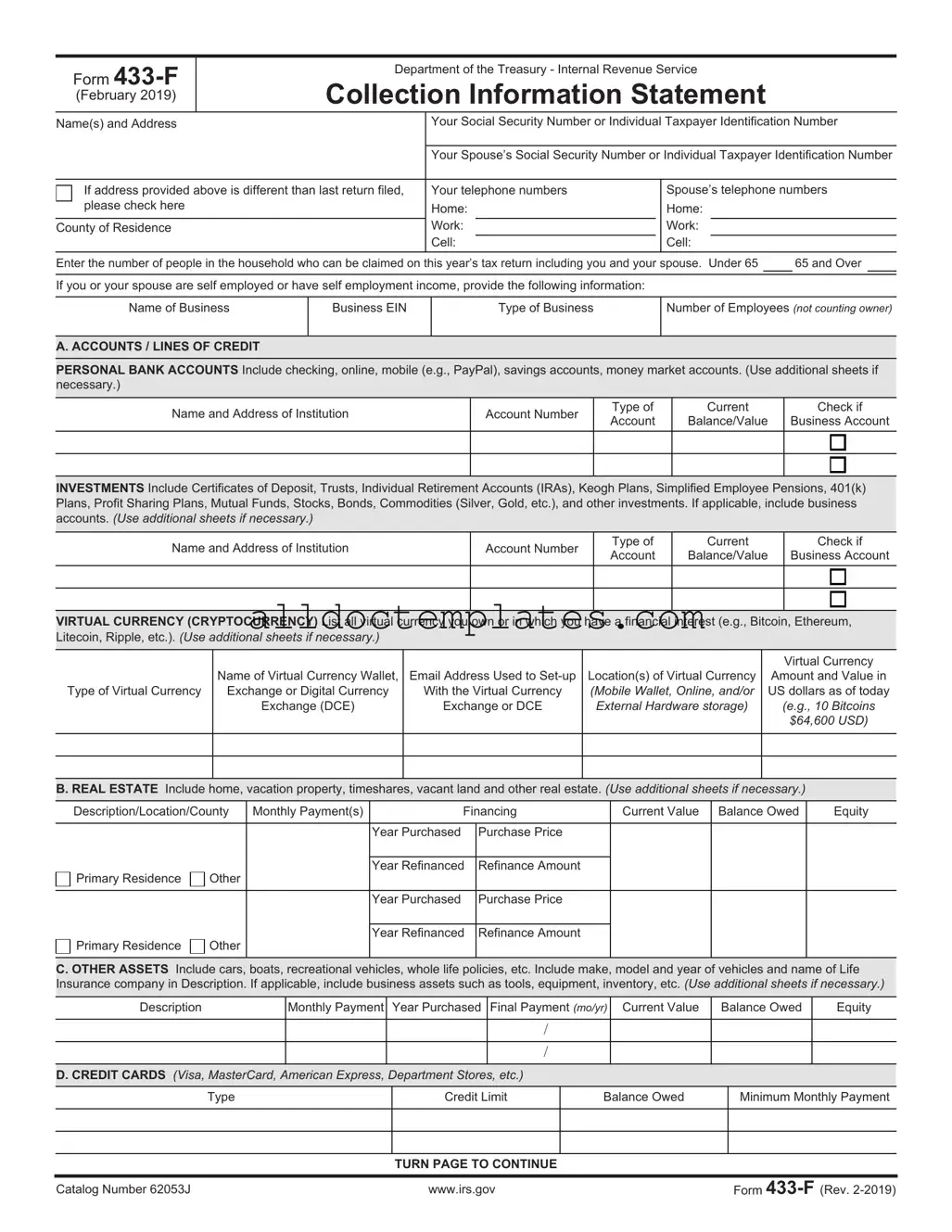
Form
(February 2019)
Department of the Treasury - Internal Revenue Service
Collection Information Statement
Name(s) and Address |
Your Social Security Number or Individual Taxpayer Identification Number |
|||||||
|
|
|
|
|
||||
|
Your Spouse’s Social Security Number or Individual Taxpayer Identification Number |
|||||||
|
|
|
|
|
|
|||
If address provided above is different than last return filed, |
Your telephone numbers |
|
Spouse’s telephone numbers |
|||||
please check here |
Home: |
|
Home: |
|
|
|
||
County of Residence |
Work: |
|
|
Work: |
|
|
|
|
|
Cell: |
|
|
Cell: |
|
|
|
|
Enter the number of people in the household who can be claimed on this year’s tax return including you and your spouse. Under 65 |
|
65 and Over |
||||||
|
|
|
|
|
|
|
|
|
If you or your spouse are self employed or have self employment income, provide the following information:
Name of Business
Business EIN
Type of Business
Number of Employees (not counting owner)
A. ACCOUNTS / LINES OF CREDIT
PERSONAL BANK ACCOUNTS Include checking, online, mobile (e.g., PayPal), savings accounts, money market accounts. (Use additional sheets if necessary.)
Name and Address of Institution
Account Number
Type of Account
Current
Balance/Value
Check if
Business Account
INVESTMENTS Include Certificates of Deposit, Trusts, Individual Retirement Accounts (IRAs), Keogh Plans, Simplified Employee Pensions, 401(k) Plans, Profit Sharing Plans, Mutual Funds, Stocks, Bonds, Commodities (Silver, Gold, etc.), and other investments. If applicable, include business accounts. (Use additional sheets if necessary.)
Name and Address of Institution
Account Number
Type of Account
Current
Balance/Value
Check if
Business Account
VIRTUAL CURRENCY (CRYPTOCURRENCY) List all virtual currency you own or in which you have a financial interest (e.g., Bitcoin, Ethereum, Litecoin, Ripple, etc.). (Use additional sheets if necessary.)
Type of Virtual Currency
Name of Virtual Currency Wallet,
Exchange or Digital Currency
Exchange (DCE)
Email Address Used to
With the Virtual Currency
Exchange or DCE
Location(s) of Virtual Currency (Mobile Wallet, Online, and/or External Hardware storage)
Virtual Currency
Amount and Value in US dollars as of today (e.g., 10 Bitcoins $64,600 USD)
B. REAL ESTATE Include home, vacation property, timeshares, vacant land and other real estate. (Use additional sheets if necessary.)
Description/Location/County |
Monthly Payment(s) |
Financing |
Current Value |
Balance Owed |
Equity |
||
|
|
|
|
|
|
|
|
|
|
|
Year Purchased |
Purchase Price |
|
|
|
|
|
|
|
|
|
|
|
Primary Residence |
Other |
|
Year Refinanced |
Refinance Amount |
|
|
|
|
|
|
|
|
|
||
|
|
|
|
|
|
|
|
|
|
|
Year Purchased |
Purchase Price |
|
|
|
|
|
|
|
|
|
|
|
Primary Residence |
Other |
|
Year Refinanced |
Refinance Amount |
|
|
|
|
|
|
|
|
|
||
|
|
|
|
|
|
|
|
C. OTHER ASSETS Include cars, boats, recreational vehicles, whole life policies, etc. Include make, model and year of vehicles and name of Life Insurance company in Description. If applicable, include business assets such as tools, equipment, inventory, etc. (Use additional sheets if necessary.)
Description |
Monthly Payment Year Purchased Final Payment (mo/yr) Current Value |
Balance Owed |
Equity |
/
/
D. CREDIT CARDS (Visa, MasterCard, American Express, Department Stores, etc.)
Type
Credit Limit
Balance Owed
Minimum Monthly Payment
TURN PAGE TO CONTINUE
Catalog Number 62053J |
www.irs.gov |
Form |
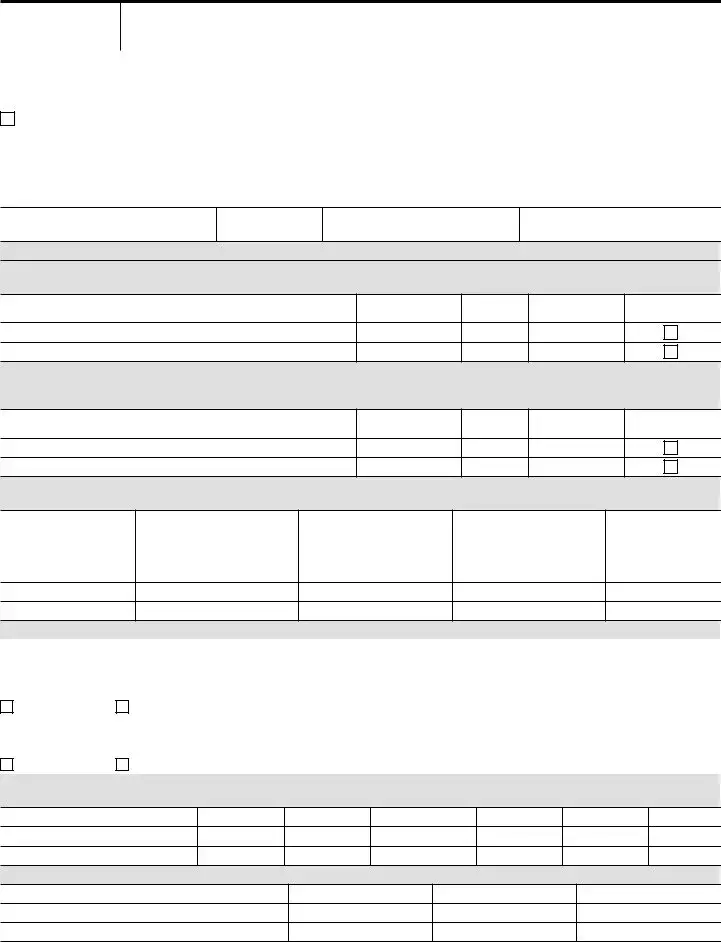
Page 2 of 4
E. BUSINESS INFORMATION Complete E1 for Accounts Receivable owed to you or your business. (Use additional sheets if necessary.) Complete E2 if you or your business accepts credit card payments. Include virtual currency wallet, exchange or digital currency exchange.
E1. Accounts Receivable owed to you or your business
Name |
Address |
Amount Owed |
|
|
|
|
|
|
|
|
|
List total amount owed from additional sheets
Total amount of accounts receivable available to pay to IRS now
E2. Name of individual or business on account
Credit Card
(Visa, Master Card, etc.)
Issuing Bank Name and Address
Merchant Account Number
F. EMPLOYMENT INFORMATION If you have more than one employer, include the information on another sheet of paper. (If attaching a copy of current pay stub, you do not need to complete this section.)
Your current Employer (name and address)
How often are you paid (check one) |
|
|
|
|
|
||||
Weekly |
Biweekly |
Monthly |
|||||||
Gross per pay period |
|
|
|
|
|
|
|
|
|
Taxes per pay period (Fed) |
|
(State) |
(Local) |
||||||
How long at current employer |
|
|
|
|
|
|
|||
|
|
|
|
|
|
|
|||
Spouse’s current Employer (name and address)
How often are you paid (check one)
Weekly |
Biweekly |
|
Monthly |
||||||
Gross per pay period |
|
|
|
|
|
|
|
|
|
Taxes per pay period (Fed) |
|
|
(State) |
(Local) |
|||||
How long at current employer |
|
|
|
|
|
|
|
||
|
|
|
|
|
|
|
|||
G.
Alimony Income
Child Support Income
Net Self Employment Income
Net Rental Income
Unemployment Income
Pension Income
Interest/Dividends Income
Social Security Income
Other:
H. MONTHLY NECESSARY LIVING EXPENSES List monthly amounts. (For expenses paid other than monthly, see instructions.)
1. Food / Personal Care See instructions. If you do not spend more than |
4. Medical |
Actual Monthly |
IRS Allowed |
||
the standard allowable amount for your family size, fill in the Total amount |
Health Insurance |
Expenses |
|
||
only. |
|
|
|
|
|
Actual Monthly |
IRS Allowed |
|
|
||
|
Out of Pocket Health Care |
|
|
||
|
Expenses |
|
|
||
Food |
|
|
Expenses |
|
|
|
|
|
|
||
|
|
Total |
|
|
|
Housekeeping Supplies |
|
|
|
|
|
Clothing and Clothing Services |
|
|
5. Other |
Actual Monthly |
IRS Allowed |
Personal Care Products & Services |
|
|
|
Expenses |
|
|
|
|
|
||
Miscellaneous |
|
|
Child / Dependent Care |
|
|
Total |
|
|
Estimated Tax Payments |
|
|
2. Transportation |
Actual Monthly |
IRS Allowed |
Term Life Insurance |
|
|
|
Expenses |
Retirement (Employer Required) |
|
|
|
|
|
|
|
||
Gas / Insurance / Licenses / |
|
|
Retirement (Voluntary) |
|
|
Parking / Maintenance etc. |
|
|
Union Dues |
|
|
Public Transportation |
|
|
Delinquent State & Local Taxes |
|
|
Total |
|
|
(minimum payment) |
|
|
3. Housing & Utilities |
Actual Monthly |
IRS Allowed |
Student Loans (minimum |
|
|
|
Expenses |
payment) |
|
|
|
|
|
|
|
||
Rent |
|
|
Court Ordered Child Support |
|
|
Electric, Oil/Gas, Water/Trash |
|
|
Court Ordered Alimony |
|
|
Telephone/Cell/Cable/Internet |
|
|
Other Court Ordered Payments |
|
|
Real Estate Taxes and Insurance |
|
|
Other (specify) |
|
|
(if not included in B above) |
|
|
Other (specify) |
|
|
Maintenance and Repairs |
|
|
Other (specify) |
|
|
Total |
|
|
Total |
|
|
Under penalty of perjury, I declare to the best of my knowledge and belief this statement of assets, liabilities and other information is true, correct and complete.
Your signature
Spouse’s signature
Date
Catalog Number 62053J |
www.irs.gov |
Form |

Page 3 of 4
Instructions for Form
What is the purpose of Form 433F?
Form
Note: You may be able to establish an Online Payment Agreement on the IRS web site. To apply online, go to https://www.irs.gov, click on “I need to pay my taxes,” and select “Installment Agreement” under the heading “What if I can't pay now?”
If you are requesting an Installment Agreement, you should submit Form 9465, Installment Agreement Request, along with Form
Please retain a copy of your completed form and supporting documentation. After we review your completed form, we may contact you for additional information. For example, we may ask you to send supporting documentation of your current income or substantiation of your stated expenditures.
If any section on this form is too small for the information you need to supply, please use a separate sheet.
Section A – Accounts / Lines of Credit
List all accounts, even if they currently have no balance. However, do not enter bank loans in this section. Include business accounts, if applicable. If you are entering information for a stock or bond, etc. and a question does not apply, enter N/A.
Section B – Real Estate
List all real estate you own or are purchasing including your home. Include insurance and taxes if they are included in your monthly payment. The county/description is needed if different than the address and county you listed above. To determine equity, subtract the amount owed for each piece of real estate from its current market value.
Section C – Other Assets
List all cars, boats and recreational vehicles with their make, model and year. If a vehicle is leased, write “lease” in the “year purchased” column. List whole life insurance policies with the name of the insurance company. List other assets with a description such as “paintings”, “coin collection”, or “antiques”. If applicable, include business assets, such as tools, equipment, inventory, and intangible assets such as domain names, patents, copyrights, etc. To determine equity, subtract the amount owed from its current market value. If you are entering information for an asset and a question does not apply, enter N/A.
Section D – Credit Cards
List all credit cards and lines of credit, even if there is no balance owed.
Section E – Business Information
Complete this section if you or your spouse are
E1: List all Accounts Receivable owed to you or your business. Include federal, state and local grants and contracts.
E2: Complete if you or your business accepts credit card payments (e.g., Visa, MasterCard, etc.) and/or virtual currency wallet, exchange or digital currency exchange.
Section F – Employment Information
Complete this section if you or your spouse are wage earners.
If attaching a copy of current pay stub, you do not need to complete this section.
Section G –
List all
Net
spouse earns after you pay ordinary and necessary monthly business expenses. This figure should relate to the yearly net profit from Schedule C on your Form 1040 or your current year profit and loss statement. Please attach a copy of Schedule C or your current year profit and loss statement. If net income is a loss, enter “0”.
Net Rental Income is the amount you earn after you pay ordinary and necessary monthly rental expenses. This figure should relate to the amount reported on Schedule E of your Form 1040.
Do not include depreciation expenses. Depreciation is a
If net rental income is a loss, enter “0”.
Other Income includes distributions from partnerships and subchapter S corporations reported on Schedule
Section H – Monthly Necessary Living Expenses
Enter monthly amounts for expenses. For any expenses not paid monthly, convert as follows:
If a bill is paid … |
Calculate the monthly |
|
amount by … |
||
|
||
Quarterly |
Dividing by 3 |
|
|
|
|
Weekly |
Multiplying by 4.3 |
|
|
|
|
Biweekly (every two |
Multiplying by 2.17 |
|
weeks) |
||
|
||
Semimonthly (twice |
Multiplying by 2 |
|
each month) |
||
|
Catalog Number 62053J |
www.irs.gov |
Form |
Page 4 of 4
For expenses claimed in boxes 1 and 4, you should provide the IRS allowable standards, or the actual amount you pay if the amount exceeds the IRS allowable standards. IRS allowable standards can be found by accessing https://www.irs.gov/
Substantiation may be required for any expenses over the standard once the financial analysis is completed.
The amount claimed for Miscellaneous cannot exceed the standard amount for the number of people in your family. The miscellaneous allowance is for expenses incurred that are not included in any other allowable living expense items. Examples are credit card payments, bank fees and charges, reading material and school supplies.
If you do not have access to the IRS web site, itemize your actual expenses and we will ask you for additional proof, if required. Documentation may include pay statements, bank and investment statements, loan statements and bills for recurring expenses, etc.
Housing and Utilities – Includes expenses for your primary residence. You should only list amounts for utilities, taxes and insurance that are not included in your mortgage or rent payments.
Rent – Do not enter mortgage payment here. Mortgage payment is listed in Section B.
Transportation – Include the total of maintenance, repairs, insurance, fuel, registrations, licenses, inspections, parking, and tolls for one month.
Public Transportation – Include the total you spend for public transportation if you do not own a vehicle or if you have public transportation costs in addition to vehicle expenses.
Medical – You are allowed expenses for health insurance and
Health insurance – Enter the monthly amount you pay for yourself or your family.
covered by health insurance, and include:
•Medical services
•Prescription drugs
•Dental expenses
•Medical supplies, including eyeglasses and contact lenses. Medical procedures of a purely cosmetic nature, such as plastic surgery or elective dental work are generally not allowed.
Child / Dependent Care – Enter the monthly amount you pay for the care of dependents that can be claimed on your Form 1040.
Estimated Tax Payments – Calculate the monthly
amount you pay for estimated taxes by dividing the quarterly amount due on your Form 1040ES by 3.
Life Insurance – Enter the amount you pay for term life insurance only. Whole life insurance has cash value and should be listed in Section C.
Delinquent State & Local Taxes – Enter the minimum
amount you are required to pay monthly. Be prepared to provide a copy of the statement showing the amount you owe and if applicable, any agreement you have for monthly payments.
Student Loans – Minimum payments on student loans for the taxpayer’s
Court Ordered Payments – For any court ordered
payments, be prepared to submit a copy of the court order portion showing the amount you are ordered to pay, the signatures, and proof you are making the payments. Acceptable forms of proof are copies of cancelled checks or copies of bank or pay statements.
Other Expenses not listed above – We may allow
other expenses in certain circumstances. For example, if the expenses are necessary for the health and welfare of the taxpayer or family, or for the production of income. Specify the expense and list the minimum monthly payment you are billed.
Catalog Number 62053J |
www.irs.gov |
Form |
Document Information
| Fact Name | Details |
|---|---|
| Purpose | The IRS 433-F form is used to collect financial information from taxpayers to determine their ability to pay tax debts. |
| Eligibility | This form is typically required for individuals who owe taxes and are seeking to enter into an installment agreement or offer in compromise. |
| Information Required | Taxpayers must provide details about their income, expenses, assets, and liabilities. |
| Submission Method | The form can be submitted electronically or via mail, depending on the specific IRS requirements at the time. |
| Frequency of Use | Taxpayers may need to complete this form each time they apply for a payment plan or negotiate their tax debt. |
| Impact on Tax Resolution | Accurate completion of the form can significantly affect the outcome of tax resolution efforts, including payment plans. |
| Governing Law | The IRS 433-F form is governed by federal tax law under the Internal Revenue Code. |
| Additional Resources | Taxpayers can find guidance and instructions for completing the form on the IRS website. |
IRS 433-F - Usage Guidelines
Filling out the IRS 433-F form is a straightforward process, but it requires careful attention to detail. This form is essential for those seeking to negotiate their tax obligations with the IRS. Follow these steps to ensure you complete the form accurately.
- Begin by downloading the IRS 433-F form from the IRS website or obtaining a physical copy.
- Fill in your personal information at the top of the form, including your name, address, Social Security number, and phone number.
- Provide details about your employment. List your employer's name, address, and your job title.
- Outline your monthly income. Include all sources of income, such as wages, self-employment earnings, and any other income streams.
- Document your monthly expenses. This includes housing costs, utilities, food, transportation, and any other regular expenses.
- List your assets. Include bank accounts, real estate, vehicles, and any other valuable possessions.
- Indicate your liabilities. This means noting any debts or obligations you currently have.
- Review your completed form for accuracy. Make sure all information is correct and clearly written.
- Sign and date the form. Your signature confirms that the information provided is true and complete.
- Submit the form to the appropriate IRS office, either by mail or electronically if applicable.
Once submitted, the IRS will review your information and may reach out for additional details. Be prepared to provide any further documentation they may request. This process can take some time, so patience is key.
Common PDF Forms
Miscellaneous Information - The form tracks miscellaneous income not classified as wages or salaries.
To facilitate the process of transferring ownership, individuals can utilize resources such as the Colorado PDF Templates, which provide easy access to the necessary forms and templates essential for completing a Colorado Bill of Sale.
Da Form 1380 - Responsibilities for completing the form vary depending on the type of training conducted.
IRS E-file Signature Authorization - It's a crucial step in the e-filing process that shouldn't be overlooked.
Dos and Don'ts
When filling out the IRS 433-F form, it’s essential to approach the process carefully. This form is used to provide the IRS with a comprehensive overview of your financial situation. Here are some important dos and don'ts to keep in mind:
- Do provide accurate and complete information about your income and expenses.
- Do include all sources of income, such as wages, rental income, and any side jobs.
- Do be honest about your assets, including bank accounts, vehicles, and real estate.
- Do use the most recent financial documents to support your claims.
- Do keep a copy of the completed form for your records.
- Don't underestimate your expenses; provide realistic figures.
- Don't leave any sections blank; if something doesn’t apply, indicate that clearly.
- Don't rush through the form; take your time to ensure accuracy.
- Don't ignore any correspondence from the IRS after submitting the form.
By following these guidelines, you can help ensure that your submission is processed smoothly and accurately. Remember, taking the time to fill out the IRS 433-F form correctly can make a significant difference in your dealings with the IRS.
Common mistakes
-
Inaccurate Information: One common mistake is providing incorrect personal information. This includes misspellings of names, wrong Social Security numbers, or incorrect addresses. Such errors can delay processing and lead to complications.
-
Incomplete Financial Disclosure: Failing to fully disclose all income sources can result in penalties. Individuals often overlook side jobs or freelance income, which can affect the overall assessment.
-
Ignoring Assets: Many people forget to list all assets. This includes bank accounts, vehicles, and real estate. Omitting these can lead to an inaccurate financial picture.
-
Miscalculating Expenses: Some individuals miscalculate their monthly expenses. This can happen when they forget to include variable expenses or underestimate fixed costs, leading to unrealistic financial representations.
-
Not Updating Information: Failing to update the form when financial situations change can create issues. If income increases or expenses decrease, it is crucial to reflect these changes accurately.
-
Neglecting to Sign and Date: Some individuals forget to sign and date the form. A missing signature can render the submission invalid, causing unnecessary delays.
-
Submitting without Supporting Documentation: Failing to include necessary documentation can hinder the review process. Individuals should provide proof of income, expenses, and assets to support the information presented.